Pick a time
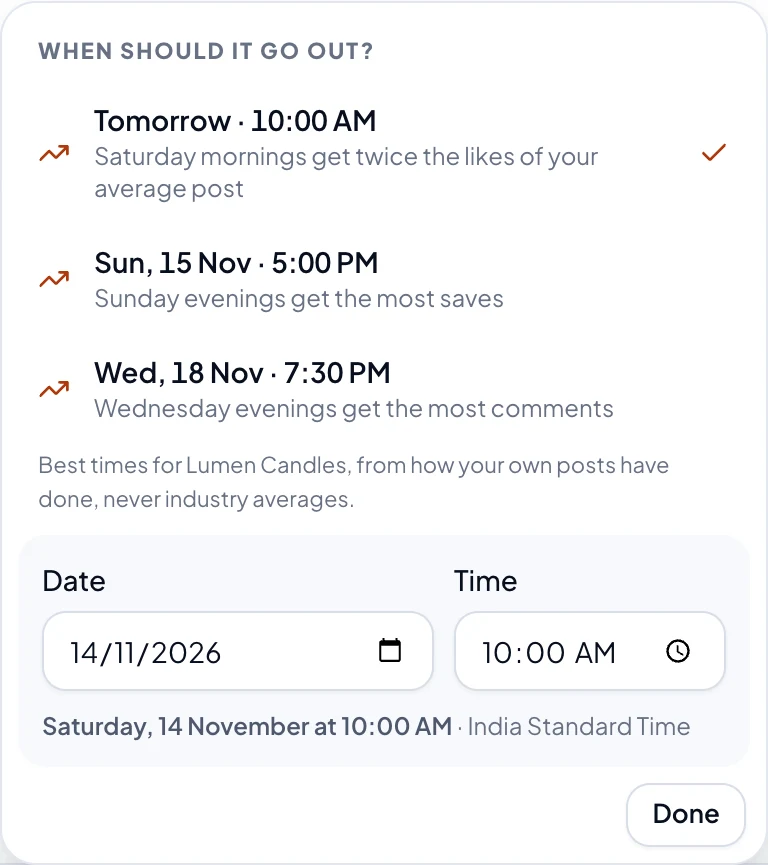
At the bottom of New post, choose the date and time (it starts at tomorrow, 10 AM). When should it go out? opens, where you pick a day and a time. Times are in your own time zone, which you set in Profile.
Best times
Once 10 of your posts have numbers, When should it go out? suggests times, from how your own posts have done, not industry averages. Until then, it says how many more it needs.
The buttons
| Button | What it does |
|---|---|
| Schedule | It goes out by itself at that time. |
| Publish now | It goes out straight away, once you say yes. |
| Save draft | It's kept, with no time, until you schedule it. |
| Send for approval | An Owner or Admin looks at it first. |
While the workspace's Approvals switch is on, Members see only Save draft and Send for approval. How approvals work.
Change a scheduled post
Open it on the Calendar or Posts page and choose Edit, then Save changes. The ⋯ menu has Move to drafts, which stops it going out, and Delete post.